How to fix Discord Connection
A fix for Discord Connection issues.
There are rare times where FiveM just shits itself and disconnects your Discord account, this means when you connect to the server, we cannot verify your permissions, and therefore reject your connection. Here's how to fix it.
1. Verification
To verify that there's actually an issue, you'll need to check your verified identities. To do that, do the following:
- Open FiveM
- Make sure you are logged into your cfx.re account
- Click the Settings Icon on the top right next to the quit button.
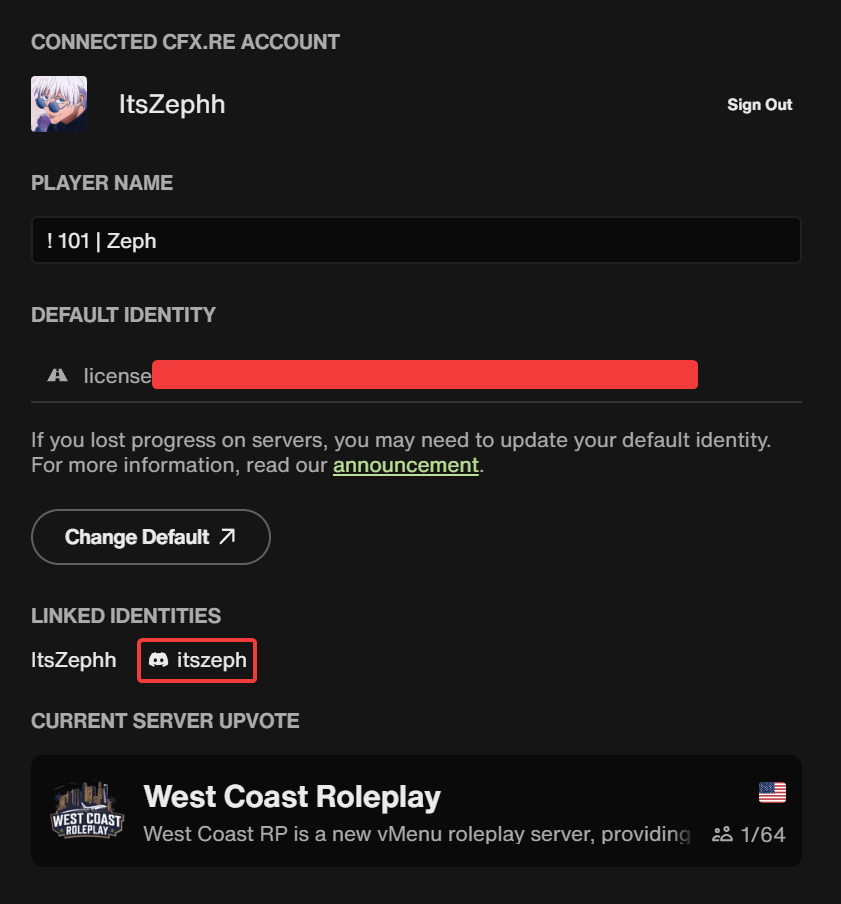
This page should lead you to the account tab, it should look like this, and your linked identities should have your Discord account showing, if it doesn't, this guide may help you, if it is showing, then this guide won't.
2. Reset
- Uninstall FiveM (this should not erase your in-game progress)
- If you have any client modifications on Discord (Vencord, BetterDiscord, etc), uninstall them. You can reinstall them after. Then reopen Discord.
- Open FiveM then login with your cfx.re account. There's a chance Discord would prompt you to link here, if it doesn't, it's not a big deal. If it doesn't, close FiveM once you've logged in.
- Restart your entire computer.
- Once your computer is restarted, open Discord, and then open FiveM, it should prompt you to link once it is open.
If this guide does not help you, open a Support Ticket.